Automated Bill of Materials
No more tedious material tracking when creating a pipe isometric drawing. As you design fabrication level isometric drawings, Easy Isometric creates a comprehensive bill of materials for purchase.

Simplify the field to fabrication shop process on your next project with Easy Isometric.
GET THE APPEasy Isometric is the first pipe isometric drawing app that helps users make detailed isometric drawings in the field and without the need for tedious reference materials.
No more tedious material tracking when creating a pipe isometric drawing. As you design fabrication level isometric drawings, Easy Isometric creates a comprehensive bill of materials for purchase.
Let the field experts easily and precisely design, document, and share their isometric drawings. This reduces the chances of incorrect pipe fabrication and the costs associated with rework.
By incorporating the most common ASME and ASTM standards, Easy Isometric will automatically calculate takeout, centerline dimensions, and end-to-end dimensions.
Eliminates many of the barriers that prevent prefabrication on a project site. Better control of just-in-time delivery, means less waste and increased productivity.
Clear labeling that automatically links with bill of materials for easy tracking, ordering, and fabricating.
New accounts receive 48 hours of app access from account creation. Sign-in is required. Eligible Apple accounts may receive a two-week introductory subscription offer. Apple’s purchase sheet shows eligibility, price, and renewal terms.
Get Easy Isometric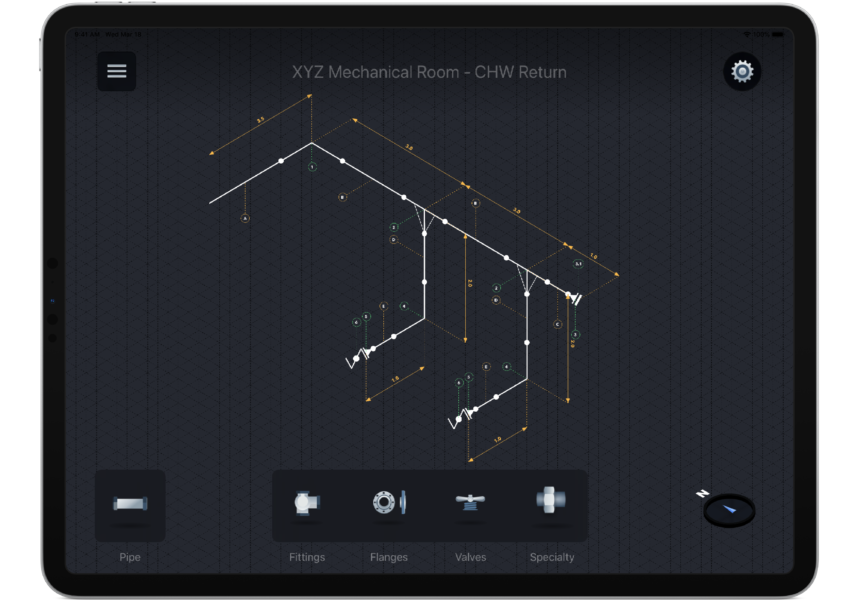
“Easy Isometric is incredibly helpful from a design standpoint. It gives me the ability to create responsive piping layouts that can then be transferred into design documents.”- B. Rogers
Below are helpful videos with instructions, which will get you up to speed with Easy Isometric.
Tap the pipe symbol and then slide your finger across the screen to the desired length. To attach pipe to a fitting or flange, tap the pipe symbol, then touch nearest the item end, and then slide your finger to the desired length. (If you are zoomed out too far this will make it more difficult to make a successful connection.)
Tap the desired item to open the sub-menu. Then tap and hold the item until it expands under your finger. While keeping your finger on the screen, drag the item to the desired location.
Tap and hold the misplaced item until the items design changes. Retry placing item in the intended location and when the green checkmark appears release finger from screen.
After selecting the desired item, drag the item to the intended connection piece. When a green checkmark appears lift your finger to place item.
Tap the hamburger menu and then tap "Share & Sync". Next tap the "Share current sheet with others" icon.
Place two fingers upon the screen, then slide your fingers across the screen to move the drawing.
Using your pointer finger and thumb, pinch to zoom out or spread to zoom in.
Tap on the placed item to open the side menu. Scroll down and tap direction under Label Rotation or Dimension Rotation.
Unlike expensive CAD and Revit software, Easy Isometric is priced to be available for all sizes of companies. From sole proprietors to large corporations, this pipe isometric drawing app can help you on your next project.
Low Upfront Cost
$0.99
Best value!
$9.99
Easy Isometric currently has:
If you have any suggestions about added standards, please let us know and we will look into adding them.
Yes, Easy Isometric has a Generic Specification. However this function will not be able to auto calculate take-off and centerline dimensions.
Butt weld, socket weld, threaded, soldered, and brazed.
Drop us a line with any questions or comments and we will get back to you.